


5 Essential Apps for Traveling in Mexico
Traveling to Mexico can be a bit overwhelming if you aren’t prepared. Transportation, a different currency and a foreign language are just a few of the things that could potentially leave you feeling lost. The good news is that there are phone apps to help you out. These five apps for traveling in Mexico are the ones I depend on and are my top recommendations.
Rome 2 Rio App
When I travel to Mexico, I usually stay a few weeks and visit multiple states and cities. Since I might be road tripping or traveling by plane, bus and even boats, a transportation app that shows me all the options available for getting from one place to another is particularly helpful.
Rome2Rio checks all the boxes. It’s become one of my most useful apps for traveling in Mexico. Or anywhere in the world really. Their tag line is “discover how to get anywhere by plane, train, bus, ferry and automobile” and that’s exactly what it does. Unfortunately, I haven’t needed the ferry info. Yet.
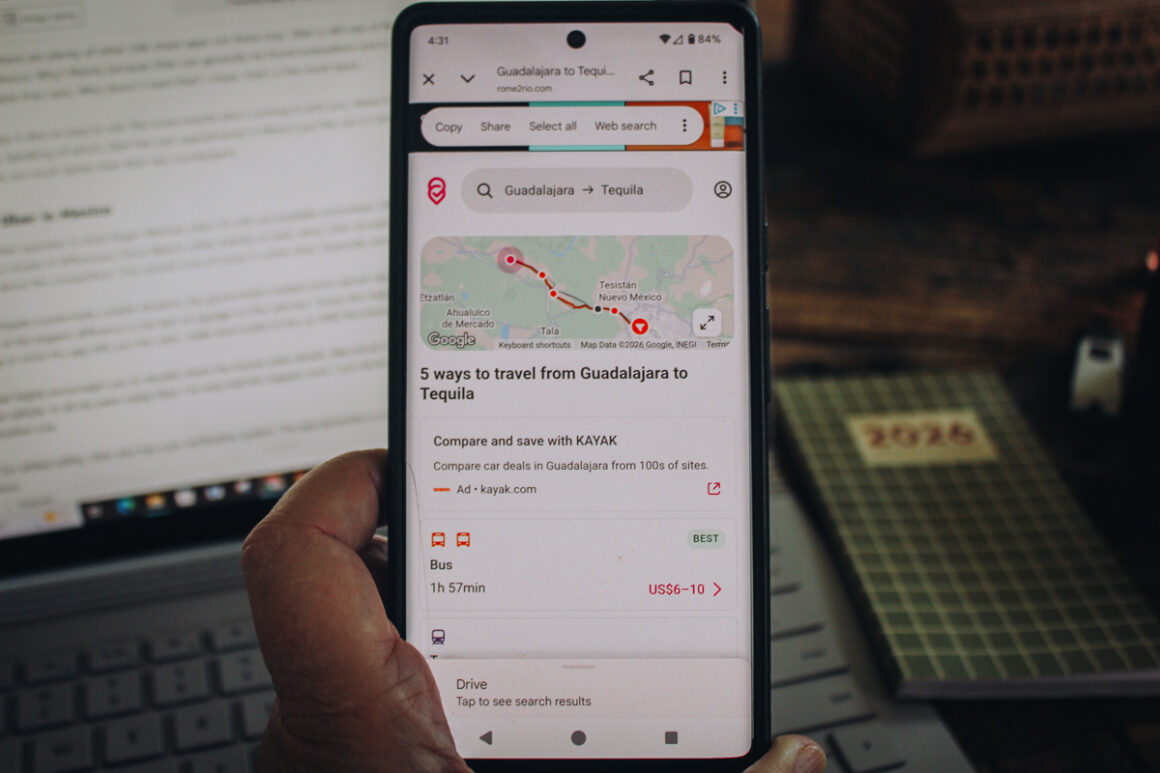
This useful app provides essential details about every mode of transportation. Just enter your starting point and destination, hit search and voila, you instantly have the results and price estimates. For example here’s the options for Guadalajara, Mexico to nearby Tequila.
After choosing the type of transportation, select that option and the app provides more info. For public transportation there’s schedules, departure times plus, bus and train station locations. The results also include frequency, duration, telephone numbers and company websites.
In my opInion, Rome 2 Rio is the best transportation app for traveling in Mexico since it provides all the ways to travel between cities. If you’re looking for buses schedules only then the Busbud app might be more helpful.
Uber App
Even though there are plenty of other ride-share apps out there now, Uber is still one of the best apps for traveling in Mexico. Why? Mainly because Uber can generally be found everywhere and in my experience, it’s more affordable than taxis. Who doesn’t want that? I mean, that’s a few more tacos.
The Uber app is also so easy to use. You know exactly who’s coming to pick you, where they are and what they are driving. Speaking of which, Uber has specific car requirements in Mexico just like the requirements in United States. In most cases, the vehicles are much better than their taxi counterparts.
Using Uber in Mexico
While Uber operates in most larger Mexican cities, it’s still not available everywhere. Where it does exist, you’ll notice a couple of differences. Since Mexico relies heavily on taxis, when Uber showed up, taxi drivers were a bit upset about the competition. This caused a lot of issues in some cities. Especially around Cancun.
To mitigate a potentially volatile situation, the government created some special regulations for Uber drivers. One of the biggest difference is the lack of signage on the vehicles. I know this might be a little off-putting but keep in mind the app tells you the color, make and model of the car AND the license plate number.
Uber highly encourages you to double-check the license plate details. Any doubt or discrepancy – don’t get in the vehicle. In all my years using Uber, I’ve only had this happen once. I just declined the ride and ordered another one.
For added safety, Uber also has a pin verification system. The app generates a unique pin when you request a ride and that pin should match up with the driver. Once he or she arrives, verify the pin and proceed with the ride.
Can Uber Pick Me Up Anywhere in Mexico?
Another Uber difference in some cities – like Cancun for example – is Uber isn’t allowed on federal property. That means they aren’t allowed at any airport, bus station or property owned by the government. In classic Mexico style, here’s where it gets a little tricky.
Uber is allowed to drop you off at the airport. Again, this is not the rule in every city. I’ve been able to get rides at the Guadalajara, Mexico City, La Paz and Tijuana airports. And this could change. Jalisco, where Puerto Vallarta is located, recently negotiated to allow Ubers to operate from the Puerto Vallarta airport (PVR).
The rule of thumb is, if in doubt, just ask. Uber is very popular and someone will know the rules. Or just add your trip and when connected with a driver and give him, or her, a call.
Southerner Says: DiDi, and InDrive have also become pretty popular rideshare platforms in the last few years but I personally have not used them yet.
More Uber Tips
For the best Uber experience: keep your Uber app up to date and have a clear, current photo on your profile. In Mexico, I did find that at times it was necessary to refresh the app to keep track of the driver’s vehicle.
One more suggestion for maximizing your experience and maintaining a good Uber rating is to be as close as you can to the pick up spot. Not being there is what gets you a bad rating. This means being conscious of one way streets – common in Mexico – and traffic flow.
At times, you might need to move to a better location for a more efficient pickup. Do this before you request a ride. If you end up moving, refresh the app to show the current location and contact your driver. Which by the way, I found, most speak some English. So, no worries there.
A Currency Converting App
Most people just use Google to convert currency but if you’d like to use a stand-alone app to convert dollars to pesos and vice versa then Galileo Data Systems Mexican Peso/U.S. Dollar app comes in handy when you don’t want the whole world to know that after six days in Mexico you still don’t have a handle on the currency thing.
This a simple, easy to use, free app with really good reviews. Since it’s free it does have ads but they don’t seem to be too annoying so far.
Google Maps
Can Google Maps can be used in Mexico? Absolutely. Google Maps uses satellites so it works virtually everywhere. I use Google Maps almost daily at home, so it’s a no-brainer that it’s of my five essential apps for traveling in Mexico.
Besides maps, savable lists and GPS, Google Maps has other useful features. Did you know that you can use it for public transportation schedules? This is really really useful in large cities Mexican cities like Mexico City or Guadalajara.
To access routes and schedules, simply tap the icon in the upper right hand corner (the one that looks like squares and a plus sign) and add public transit filter. Any available services – like bus and train options – will show up on the map.
Click the corresponding icons (it might appear as a small bus or train and sometimes a logo) for the current schedule and details about when the next one available will be passing. You’ll be able to see delays and even photos of what the bus stop or train station looks like.
More Google Map Features
Another useful feature of Google Maps is downloadable offline maps. This is particularly helpful when traveling somewhere without cellular service or Wi-Fi. I downloaded a bunch of maps before I visited Cuba and it was so nice to have access to.
Southerner Says: Even without service, with satellites, you’ll always be able to see your location on your map. What’s not available is step by step guidance.
To download a map on your device: open Google Maps and navigate to the map you want to download. Click your profile photo on the upper right side. This opens your account and shows all available actions. Select Offline Maps to open the next screen.
Tip: Some offline maps expire after a specified amount of time. So it’s better to wait as close as you can to your departure date to download maps. If a map expires, Google says they will update automatically when there’s Wi-Fi available.
WhatsApp for Staying in Touch in Mexico
A billion people can’t be wrong, right? That’s how many people use WhatsApp. In fact, WhatsApp is the most used app in Mexico. If you aren’t using yet, you might want to start – even when you’re in your home country.
WhatsApp is a freeware and cross-platform messaging and voice using your internet service when it can. This app allows the sending of text messages and voice calls, as well as video calls, images and other media.
I was able to communicate even when standard text messaging wasn’t available. That alone makes it one of the most useful things about WhatsApp for traveling in Mexico.
Another feature that makes WhatsApp especially convenient on the road is how easy it is to connect with new contacts. Unlike most messaging platforms, WhatsApp lets you instantly share your contact information with a QR code – no typing phone numbers required.
Just tap the three dots in the upper right corner, select Settings, and you’ll see a QR code next to your profile photo that others can scan to add you in seconds.
Before Any of These Apps Work — Sort Out Your Data
Before any of these apps can do their job, you need data. If you’re traveling to Mexico I recommend Airalo for an eSIM. You download a local Mexico data plan directly to your phone before you leave — no hunting for a SIM card when you land, no outrageous roaming charges and no fumbling with a physical swap. You’ll have service from the moment you step off the plane.
Best Apps For Mexico Travel
So there you have it — five apps that will make traveling in Mexico easier, safer and a whole lot more fun. Whether you’re navigating Mexico City on foot, catching an Uber in Puerto Vallarta or trying to figure out the bus schedule in a town with no WiFi, having the right tools on your phone makes all the difference.
Planning a trip to Mexico and want help putting it together? I’d love to help. Fill out my trip planning form or email me.
More Mexico from Southerner Says:
- Is Mexico Safe for Travel
- Things to Know Before Visiting Mexico
- Mexico Tourist Card — What You Need to Know
- 25 Best Places to Visit in Mexico
See you south of the border!

Author: Lori Blalock
A girl raised in the South, Lori is the founder of Southerner Says and is a travel advisor who’s road tripped all 50 states and visited over half of the Mexican states. Passionate about national parks, sunsets and good barbecue, she writes about and helps others plan adventures in the U.S., Mexico and Caribbean. Georgia is home — but she’s rarely there.









I recently visited Mexico for the very first time and had a Spanish-English app on my phone. But it seemed when I used it, it wasn’t well understood. One Mexican person had their own Spanish-English app that they used. Now that I’m home, I’m looking for a good Mexican-English app or, even better, a Learn Mexican app. Any suggestions?
Actually that’s why I didn’t include a language app. I have not found one I like for travel. I used to always carry a small dictionary but now I speak Spanish so I don’t need it as much. I just use an online lookup if I don’t understand a word. As far as learning Duolingo is a really good app and learning tool. Happy travels!
What is the best app for getting realtime driving directions in Mexico (while driving in a car)? Do you think it’s Waze?